
Cybersecurity labs
Walk packet captures, threat hunts, and lab workflows while the educator and practice surface stay visible together.
For adult technical tutoring providers
SeesThru gives adult technical tutoring providers and software-skills instructors a browser workspace where the educator, explanation, and practice surface stay visible together. Rehearse a lesson with a camera or local lesson video behind an illustrative practice tool, then guide attention with a focus marker.
One stage, different work
Choose a workflow to compare the separate windows with the coordinated SeesThru stage.
Packet analysis
Follow one packet from capture to explanation without leaving the lesson.
Separate setup
3-screen setup1. Educator camera
Guidance and gesture
2. Packet capture
Read-only practice table
3. Reference notes
The why behind the step

Packet Capture · Practice Preview
| No. | Time | Source | Destination | Protocol | Length | Info |
|---|---|---|---|---|---|---|
| 1 | 0.000000 | 10.0.1.24 | 10.0.1.1 | DNS | 74 | Standard query 0x4a21 A lab.seesthru.local |
| 2 | 0.002184 | 10.0.1.1 | 10.0.1.24 | DNS | 118 | Standard query response 0x4a21 A 10.0.1.40 |
| 3 | 0.004901 | 10.0.1.24 | 10.0.1.40 | TCP | 66 | 443 → 51244 [SYN] Seq=0 Win=64240 |
| 4 | 0.006112 | 10.0.1.40 | 10.0.1.24 | TCP | 66 | 51244 → 443 [SYN, ACK] Seq=0 Ack=1 |
| 5 | 0.006340 | 10.0.1.24 | 10.0.1.40 | TCP | 54 | 443 → 51244 [ACK] Seq=1 Ack=1 |
| 6 | 0.008775 | 10.0.1.24 | 10.0.1.40 | TLSv1.3 | 517 | Client Hello (SNI=lab.seesthru.local) |
| 7 | 0.011402 | 10.0.1.40 | 10.0.1.24 | TLSv1.3 | 1484 | Server Hello, Change Cipher Spec |
| 8 | 0.014880 | 10.0.1.24 | 10.0.1.40 | TLSv1.3 | 127 | Change Cipher Spec, Application Data |
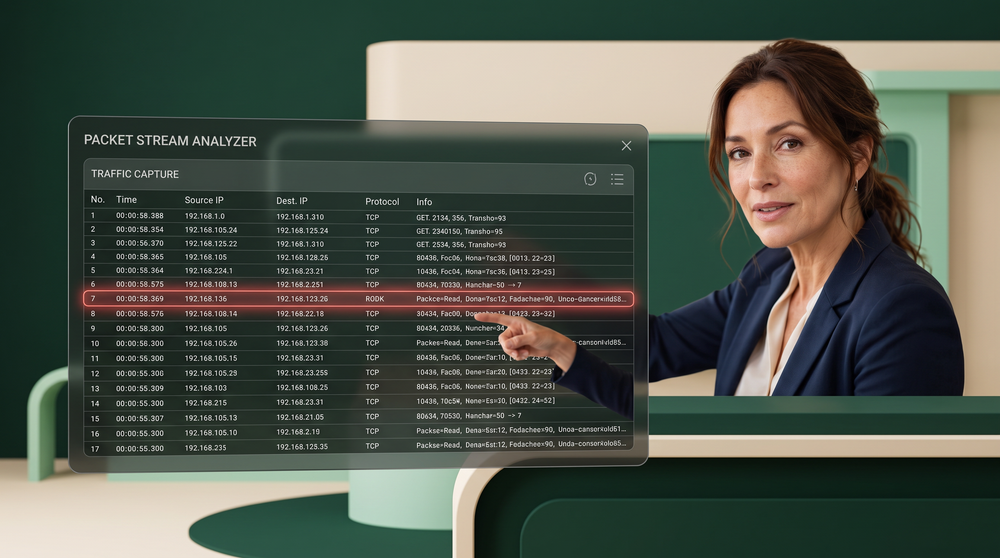
A soft educator focus glow keeps the pointing gesture in the same frame as the selected packet row.
Lower the surface opacity to reveal more of the educator. The percentage controls this visual layer only.
Visual demonstration only. The current release is local/browser-based, and the practice surfaces are illustrative.
First focus areas
Begin with cybersecurity labs, data and spreadsheet practice, and software-skills tutoring. These are SeesThru's first focus areas for the browser workspace, with broader disciplines to follow as the product develops.
Walk packet captures, threat hunts, and lab workflows while the educator and practice surface stay visible together.
Work through spreadsheets, charts, and data exercises without sending the explanation behind another window.
Rehearse software-skills explanations with the lesson video and browser practice surface visible in one stage.
Design goal
Many educators juggle camera, slides, the practice tool, notes, chat, and references. SeesThru aims to collapse that scatter into a lesson layer and a working layer. This diagram shows the product direction, not a measured hardware claim.
Typical multi-window setup
SeesThru coordinated stage
How it works
SeesThru keeps the educator visible, the practice tool usable, and attention guided with a soft focus glow reserved for educators.
Your camera or a prepared lesson video sits full-opacity at the back of the stage. Students keep a clear view of you while they work the tool in front.
A translucent practice surface layers over the lesson. Adjust opacity and blur so labels stay readable and your gestures still show through.
Tap a row or cell to fit a soft red educator glow, or drag a manual box. The glow stays crisp even when the tool is faded back.
Illustrative catalog
These names show the kinds of technical tools and learning platforms SeesThru is being shaped around. They are reference lists, not live vendor connections. The current Classroom runs locally in the browser, with no vendor roster sync or SSO.
These tool names come from the supplied catalog. A listed name is not a vendor endorsement, a live connection, or a promise that SeesThru launches or controls that software.
These platform names show the intended direction. The current release does not connect live LMS accounts, roster sync, or SSO, and the list does not imply an active integration.
Try it now
Switch between Teach and Learn, fade a packet table or spreadsheet over your camera or a local video file, and place educator focus with a tap or drag. Preferences stay on this device.
Browser workspaces can host compatible practice surfaces and lesson video. They cannot make every desktop application translucent or approve student actions inside software they do not control. This release is the foundation for that larger teaching goal, scoped to what works well in the browser today.